


You renamed a product. You merged two categories. You deleted a tag. In the shop, the new address works. In Google Search Console, the old URL still appears in crawl stats, coverage, or as a 404. That is not Google being stubborn for fun. It is Google doing what it always does: visiting addresses it already knows, until you give it a clear, consistent instruction. SEMTAK’s WooCommerce indexing guide splits the job into four steps. Google must find the URL, crawl it, read what the page says (canonical, robots, links), then decide whether to keep it in the index. A page can be known but not yet crawled, crawled but not indexed, indexed as a duplicate, excluded by noindex, or retired after a redirect. Adding a URL to the sitemap does not guarantee indexing. Leaving it out of the sitemap does not hide it if other pages still link to it. So when you change a slug, the old path does not vanish from Google’s memory. Bookmarks, internal links, sitemaps, filter plugins and other sites keep handing it over. The question is what happens when the bot arrives.
Pick one tool. Do not stack all of them
SEMTAK’s most useful warning is not a list of paths to block. It is this: do not fire every mechanism at once. First decide what the old URL is. Is it a duplicate of a live page? Is the product gone for good? Or should the page exist for customers but stay out of Google? A 301 is a permanent move. Use it when the offer still exists under a new slug, two categories became one, or a tag was merged into a canonical name. The destination must be the closest equivalent, not the homepage. A homepage dump tells Google “this topic is over” and throws away the ranking the old URL had earned. A 410 (or a clean 404 after a real removal) is for pages with no successor: a discontinued SKU, a campaign landing you will never revive. Redirecting every dead product to the shop root looks tidy in the admin. In search it looks like a lie. A temporarily out-of-stock product is usually still a 200. SEMTAK is explicit: if it is coming back, keep the URL, keep the content, show the stock message. Killing the URL for a two-week gap trains Google to forget a page you will need again. noindex means “you may crawl this, but do not show it in results.” Cart, checkout, account, internal search and most sort URLs belong here more often than in robots.txt. Why? Because if you block a URL in robots.txt, Google often never downloads the HTML — so it never sees the noindex or the canonical you carefully added. SEMTAK’s line is worth repeating: robots.txt limits visits; noindex limits the index; the canonical names the preferred version; a 301 moves the address.
The old URL is not always a product. Sometimes it is a filter
The other reason Google “still visits the old one” is that WooCommerce never had only one URL per product. ContentGecko on faceted navigation describes a store with 500 products and five filters generating 50,000+ URL variations. One client’s category rankings fell after filters went live: Google was crawling 12,000 parameter URLs instead of about 200 real categories. New products waited weeks while the bot chewed ?color=blue&size=medium&sort=price. Google retired the old Search Console URL Parameters tool. You cannot whisper “ignore sort” in the UI any more. Without canonicals, robots rules or JS filters, each combination looks like a new page. Duplicate warnings such as “Google chose a different canonical” are the symptom. The cause is usually filters, sort, price sliders and pagination stacked on the same products. Their crawl-budget guide puts numbers on the waste: five attributes with ten values can mean on the order of 100,000 URLs. If the bot has a limited daily budget and most of it goes to parameter junk, product pages that actually sell get visited less. They also note a practical result from blocking non-essential parameter pages in robots.txt: in some large catalogues, new products and collections were indexed roughly 25% faster within three months. That is not a promise for every shop. It is a reason to stop treating every filter click as an SEO page. Better Robots.txt uses a similar scale: 500 products can balloon into tens of thousands of crawlable variants — cart states, ?orderby=, ?add-to-cart=, attribute filters, feeds on category archives. Cart, checkout and My account should not be search destinations. Product pages, category landing pages and (usually) image files should stay crawlable. Pagination is a judgement call: large catalogues may trim it; small ones still need page 2 so Google can walk the list. Index a filtered view only when people actually search that combination — and then give it a real URL, a real H1 and unique text, not a query string. ContentGecko’s rule of thumb: if demand is there, build a landing page. If not, canonicalize or noindex the parameter version and keep the filter for humans in the shop.
What to do when Search Console still lists the old address
Open the URL Inspection tool on the old path. Note the status: 404, 301, redirected, crawled, excluded by robots.txt, duplicate. Each one needs a different fix. If you meant a move and the old URL 404s, add the 301 today. Check internal links, menus, product descriptions and the XML sitemap. A sitemap should list only URLs that return 200 and that you want indexed. SEMTAK is clear on that. Leaving the old slug in the sitemap is an invitation to keep crawling it. If the old URL is blocked in robots.txt but you also set a 301, Google may never fetch the redirect. Remove the disallow for that path, let the 301 be crawled, then wait. Do not “fix” a redirect by hiding the URL from the bot. If crawl stats show thousands of ?filter_ and ?orderby= hits, that is not a slug typo. It is architecture. Block sort and junk filter patterns in robots.txt after you know you are not hiding a canonical you need the bot to see. Use noindex on thin filter pages you still want crawled for links. Keep /product/, /product-category/ and uploads allowed. Test with URL Inspection: filtered junk should show as blocked or noindexed; the live product should be crawlable. Watch coverage for “Discovered – currently not indexed” on real products while parameter URLs eat the log. That imbalance is the crawl-budget story in one screenshot. 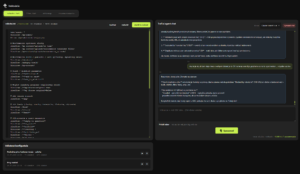 Trafixi keeps 301 and 410 rules in one list, with hit counts on real visits, plus robots.txt and sitemap health in the same indexing screen. The plugin does not replace the decision: move, gone, or stay live. It stops that decision living in three plugins and an FTP file.
TraFixi’s Indexing workspace puts the files and rules that tell crawlers what to do into one WordPress screen:
robots.txt,llms.txt, sitemap health and redirects. You are not editing a file over FTP and hoping Googlebot notices. You load the live robots file, see what the shop is serving today, and open a short AI chat beside it. The agent can use Search Console context, so the discussion is not generic “block /cart” advice. It is about this catalogue: filter URLs that waste crawl budget, paths that must stay crawlable, and rules that would hide a product page by mistake.
Nothing goes live on chat alone. You get a green/red diff, then you publish or save a draft. You can turn the TraFixi robots engine off without deleting that draft, so a bad experiment does not have to become a panic restore. The same load–chat–diff–publish pattern applies to llms.txt when you want a controlled note for AI crawlers instead of a random archive dump. Redirects sit in the same place. The list holds 301 and 410 rules — added by hand, imported from CSV or text, or created when tags are merged, renamed or removed. Each rule can show hits and the last real visit, so you see whether Google or customers still knock on the old URL. Export a copy, run a conflict check against another redirect plugin, and switch the engine off if you need to pause without wiping the list. Sitemap health is a read-only check: is the XML sitemap reachable, or is coverage failing after a move. The agent is there to argue the rule with you. You still choose. Apply writes the file or the redirect. Until then, the live shop stays as it is.Google will visit the old URL. Your job is to answer in one voice. Same offer, new address: 301. No successor: 410. Still for sale, just empty on the shelf: keep the URL. Filter noise: stop pretending every combination is a page. Until those four answers are consistent, Search Console will keep showing a ghost that you already “fixed” in WooCommerce.
Learn more in our Google can’t sell a photo it can’t read section.